


Power Apps Developer Plan Deprecation: What Microsoft Announced and What It Means for Your Organization

- The short version
- What is the Power Apps Developer Plan deprecation?
- Key dates in the deprecation timeline
- What is affected?
- What is not affected?
- Why is Microsoft ending unmanaged developer environments?
- Managed vs unmanaged developer environments: the key differences
- What this change means for licensing
- What environment routing has to do with it
- Why this matters for business leaders
- Also announced: Dataverse for Teams deprecation
- Key takeaways
- Final thoughts
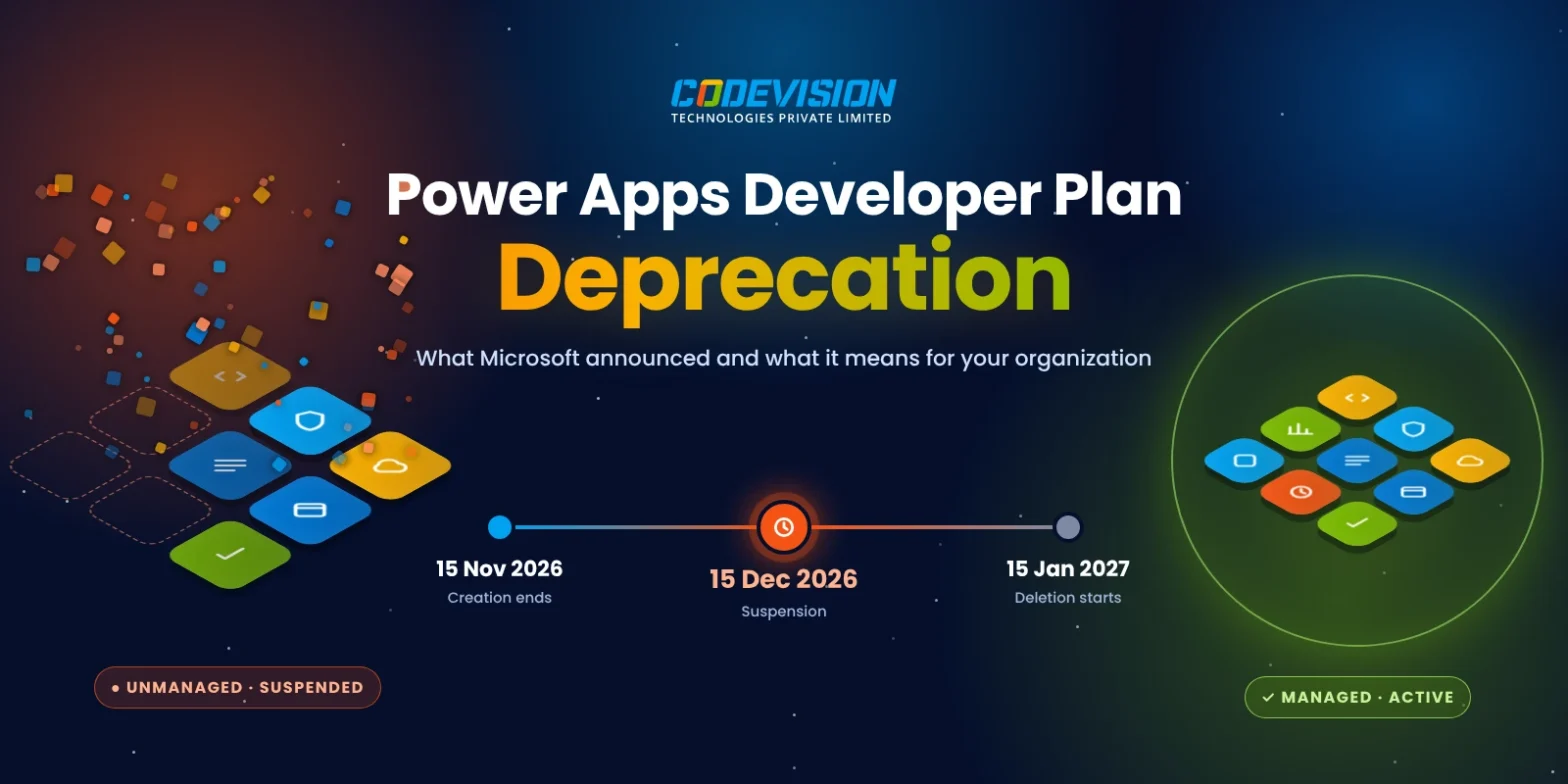
Microsoft is changing how organizations use developer environments in Power Platform. Starting November 15, 2026, signing up for the free Power Apps Developer Plan will no longer create an unmanaged developer environment. Existing unmanaged developer environments will be suspended from December 15, 2026, with deletion beginning January 15, 2027.
The announcement matters to more people than developers. Many companies have apps, flows and agents that started as experiments in these environments and later became part of daily work. This article covers what Microsoft announced, who is affected, and why the change is happening. If your team builds with Power Apps developer tools, here is what you need to know.
The short version
- What: Microsoft is deprecating unmanaged developer environments, including those created by the free Power Apps Developer Plan.
- When: New ones stop on November 15, 2026. Existing ones are suspended on December 15, 2026 and deleted from January 15, 2027.
- Not affected: Managed developer environments, plus production, sandbox, trial and default environments.
- Licensing: Running apps and flows in a managed developer environment needs a premium license.
What is the Power Apps Developer Plan deprecation?
The Power Apps Developer Plan deprecation is Microsoft’s retirement of unmanaged developer environments in Power Platform. According to the Microsoft Learn announcement, this includes “the developer environments that Power Platform creates when you sign up for the free Power Apps Developer Plan.”
The developer environment type is not going away completely. It will continue only as a managed developer environment. Going forward, each user can create only one managed developer environment.
Existing managed developer environments are not changed. This holds even if a user already has more than one.
Key dates in the deprecation timeline
Microsoft has set three dates for the Power Apps Developer Plan deprecation.
- November 15, 2026: Creation ends. Signing up for the Developer Plan no longer creates a developer environment. Users can’t create new unmanaged developer environments from Power Apps, the Power Platform admin center, PowerShell or the Power Platform CLI.
- December 15, 2026: Suspension starts. Existing unmanaged environments are suspended. Their apps, flows, agents, Power Pages developer sites and data become unavailable.
- January 15, 2027: Deletion starts. Suspended environments are deleted.
December 15 is the date most organizations will feel first. From that day, makers and users lose access to everything inside a suspended environment.
What is affected?
The following are in scope:
- Unmanaged developer environments
- Developer environments created by signing up for the free Developer Plan
- Apps, flows, Copilot Studio agents and data inside those environments
- Power Pages developer sites inside those environments
Power Pages sites need special attention. Microsoft states they are deleted with the environment unless the environment is converted to a managed environment before December 15, 2026.
What is not affected?
The following continue to work as before:
- Managed developer environments
- Personal developer environments created by environment routing, which are managed by default
- Production, sandbox, trial and default environments
- Solutions exported from an unmanaged developer environment before it is suspended
Standard trial environments also remain available for anyone who wants to try premium capabilities.
Why is Microsoft ending unmanaged developer environments?
The reason is Power Platform governance. Microsoft states that unmanaged developer environments “sit outside many of the governance controls that admins rely on, such as Managed Environments policies, usage insights, and sharing limits.”
In plain terms, admins had little visibility into what was built in these environments. Apps could hold business data with no sharing limits and no usage reports. For IT leaders responsible for security and audits, this was a blind spot.
The change brings every developer environment under the same governance controls as the rest of the platform.
Managed vs unmanaged developer environments: the key differences
A managed environment is a Power Platform environment with premium governance controls turned on. The Managed Environments overview describes them as a way to “manage Power Platform at scale with more control, less effort, and more insights.”
Here is how the two types compare after this change:
| Comparison | Unmanaged Developer Environment | Managed Developer Environment |
|---|---|---|
| Status after December 15, 2026 | Suspended, with deletion starting January 15, 2027 | Continues to work |
| Governance controls | Outside Managed Environments governance policies | Supports enhanced governance controls |
| Sharing limits | Not covered by Managed Environments sharing policies | Supports sharing limits |
| Usage insights | Not covered by Managed Environments usage insights | Provides usage insights |
| Environment routing | Not created through environment routing | Developer environments created through environment routing are managed by default |
| Licensing | Available through the free Power Apps Developer Plan | Premium license required to run apps and flows |
What this change means for licensing
Licensing is the part of this announcement with the most budget impact. Microsoft states that Managed Environments use rights “aren’t included in the Power Apps Developer Plan.”
Users need a premium license to run apps and flows in a managed developer environment. Creating or previewing apps and flows does not require one, according to Microsoft’s environment routing documentation.
Managed Environments are included as an entitlement with standalone Power Apps, Power Automate, Microsoft Copilot Studio, Power Pages and Dynamics 365 licenses. Organizations that already hold these licenses may find the impact smaller than expected.
What environment routing has to do with it
Environment routing is a Power Platform setting that sends makers to their own personal developer environment instead of the shared default environment. Microsoft describes it as “a personal, safe space to build with Microsoft Dataverse without the fear of others accessing their apps or data.”
It matters here because Microsoft states that “all developer environments created through environment routing are managed.” These environments are not affected by the deprecation. Routing is off by default and only tenant admins can turn it on.
Why this matters for business leaders
The Power Apps Developer Plan deprecation is not only a technical update. It touches several areas that executives track.
- Business continuity: Apps and flows that teams rely on may live in environments nobody has listed as critical.
- Data access: Data stored in a suspended environment becomes unavailable on December 15.
- Licensing spend: Moving work into managed environments may require premium licenses for some makers.
- Governance and compliance: Every developer environment will now fall under admin controls such as sharing limits and usage insights.
- Maker productivity: The one-environment-per-user limit changes how individual makers organize their work.
Many organizations do not know how much work sits in personal developer environments. That gap is what makes this announcement worth reading closely.
Also announced: Dataverse for Teams deprecation
The same Microsoft page lists a second deprecation that starts on the same day. Creation of Dataverse for Teams environments ends on November 15, 2026.
Those environments are suspended on September 15, 2027 and decommissioned on October 30, 2027. Organizations that built apps inside Microsoft Teams should note both timelines together.
Key takeaways
- The Power Apps Developer Plan deprecation suspends unmanaged environments on December 15, 2026 and deletes them from January 15, 2027.
- New unmanaged developer environments can’t be created after November 15, 2026.
- Managed developer environments and production, sandbox, trial and default environments are not affected.
- Each user can create only one managed developer environment going forward.
- Running apps and flows in a managed developer environment needs a premium license.
- Microsoft’s stated reason is governance: unmanaged environments sat outside admin controls.
- Dataverse for Teams environments follow a separate deprecation timeline starting on the same date.
Final thoughts
The Power Apps Developer Plan deprecation marks a clear shift in how Microsoft treats developer environments. Free, unmanaged spaces are ending, and every developer environment will now sit under admin governance.
For business and IT leaders, the key date is December 15, 2026. Knowing what lives in your developer environments before then is the difference between a smooth change and lost access.
Microsoft partners such as Codevision Technologies build on Power Apps, Power Automate, Power BI and Power Pages. To learn more about Power Platform and Power Platform governance, visit our Microsoft Power Platform page.
Frequently Asked Questions
It is Microsoft’s retirement of unmanaged developer environments in Power Platform, including the environments created by the free Power Apps Developer Plan. Developer environments now continue only as managed developer environments.
Creation of new unmanaged developer environments ends on November 15, 2026. Existing ones are suspended on December 15, 2026, and deletion starts on January 15, 2027.
Managed developer environments are not affected, including personal developer environments created by environment routing. Production, sandbox, trial and default environments are also not affected.
Their apps, flows, agents, Power Pages developer sites and data become unavailable to makers and users. Solutions exported before suspension are not affected.
Yes, to run apps and flows. Managed Environments use rights are not included in the Power Apps Developer Plan, but they are included with standalone Power Apps, Power Automate, Microsoft Copilot Studio, Power Pages and Dynamics 365 licenses.
Each user can create only one managed developer environment going forward. Existing managed developer environments are not changed, even if a user already has more than one.
Microsoft states that these environments sit outside many governance controls that admins rely on, such as Managed Environments policies, usage insights and sharing limits.
Power Pages sites in an unmanaged developer environment are deleted with the environment unless the environment is converted to a managed environment before December 15, 2026.

Recent Posts
Gujarat Tech Expo 2026: A CXO Playbook to Turn 3 Days of Demos into a Measurable IT Roadmap
PHP2Shell Vulnerabilities: What Businesses Need to Know and How to Protect Their Systems
What Is a Microsoft Frontier Firm? 7 Characteristics of AI-First Organizations
Digital Transformation vs. Frontier Transformation: What’s the Real Difference?
Let's Talk
Social Links


Related Articles

Tech Event
6 min readGujarat Tech Expo 2026: A CXO Playbook to Turn 3 Days of Demos into a Measurable IT Roadmap
Gujarat Tech Expo 2026: A CXO Playbook to Turn 3 Days of Demos into a Measurable IT Roadmap
WordPress
4 min readPHP2Shell Vulnerabilities: What Businesses Need to Know and How to Protect Their Systems
Read about the critical PHP2Shell vulnerabilities, affected PHP versions, potential risks, and the steps businesses should take to protect their web applications.
Microsoft Frontier
7 min readWhat Is a Microsoft Frontier Firm? 7 Characteristics of AI-First Organizations
AI adoption is no longer just about using tools—it is about building an AI-first operating model. Learn what a Microsoft Frontier Firm is and the 7 defining characteristics that separate industry leaders from the rest.
