


Why Companies Lose Thousands on Unused Office Assets Every Year

- What Are Unused Office Assets?
- Why Visibility Matters More Than Inventory
- Why Businesses Accumulate Unused Office Assets
- What Unused Office Assets Actually Cost You
- Hidden Costs of Manual Asset Management
- Spreadsheets vs. Internal Marketplace: A Comparison
- Spreadsheet Tracking vs. CV Classified
- 6 Proven Practices to Reduce Unused Office Assets
- Mistakes to Avoid in Office Asset Management
- A Real-World Example: The 20-Laptop Discovery
- Key Benefits of a SharePoint Internal Marketplace
- Key Benefits of CV Classified
- How Codevision Used SharePoint to Solve Asset Waste
- How we addressed it with SharePoint:
- How Will Codevision Assist with Office Asset Management?
Every business invests in office assets expecting them to support productivity and deliver value over time. From laptops and monitors to furniture, mobile devices, and meeting-room equipment, these represent a major capital investment. Yet in most organizations, a surprising share sit idle. With global enterprises now spread across hybrid work, multiple locations, and constant technology refreshes, keeping track of what you own has become harder than ever — and the cost of losing track shows up directly in the procurement budget.
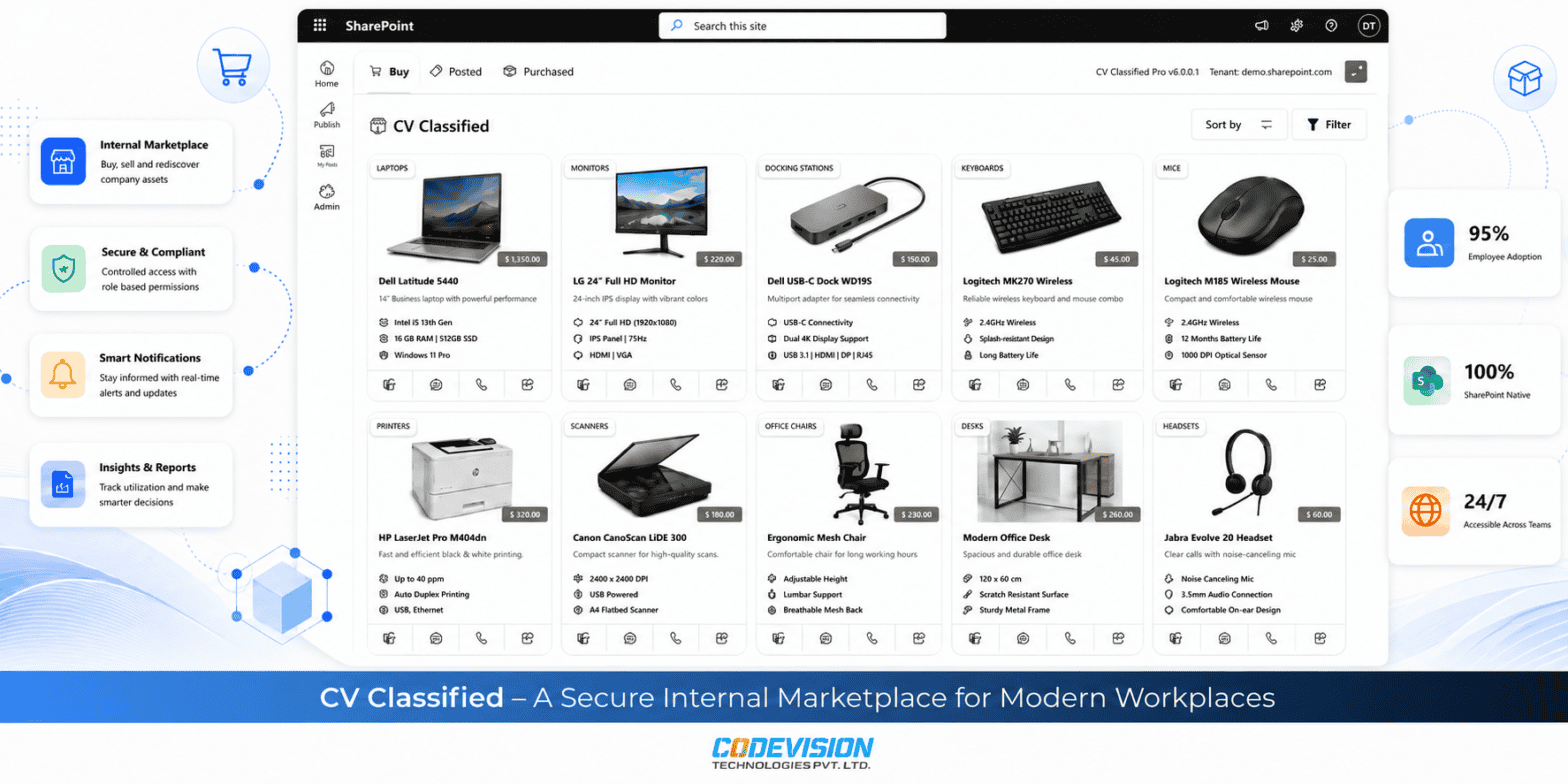
As Microsoft-certified SharePoint development specialists, Codevision helps organizations turn their existing Microsoft 365 environment into a searchable internal marketplace, so no functional asset stays hidden in a storage room.
What Are Unused Office Assets?
Unused office assets are company-owned resources that remain fully functional but are no longer actively used by any employee. Common examples include laptops, monitors, desks, chairs, printers, conference-room equipment, and accessories like docking stations and headsets. They aren’t broken or obsolete — they’re simply idle, which is exactly what makes them easy to forget and expensive to ignore.
Every asset moves through a lifecycle, and knowing where an item sits tells you what to do with it:
- Active — in daily use by an assigned employee.
- Idle — temporarily unassigned but ready to redeploy immediately.
- Surplus — functional but unlikely to be needed at its current location; a prime candidate for internal redistribution.
- Retired — genuinely end-of-life and ready for responsible recycling or disposal.
Most waste hides in the idle and surplus stages, where equipment is perfectly usable but invisible to the people who need it
Why Visibility Matters More Than Inventory
Having an inventory is not the same as having visibility. Many organizations maintain detailed asset registers that employees never see, cannot search, or do not trust. The record exists, but the person onboarding a new hire has no practical way to check it before requesting new equipment. A centralized marketplace closes that gap by letting employees discover reusable assets themselves — before procurement begins.
Why Businesses Accumulate Unused Office Assets
Surplus builds up through ordinary business activity, not negligence. Experts at Codevision see it happen most often through:
- Employee turnover returning equipment to storage.
- Technology refresh programs replacing hardware that still works.
- Office expansion and restructuring scattering assets across locations.
- Spreadsheet-based tracking that falls out of date the moment a cell goes unupdated.
Returned laptops, monitors, and furniture then sit in storage while procurement buys new equipment — simply because existing assets are invisible to the people making purchasing decisions.
What Unused Office Assets Actually Cost You
The cost of idle assets extends well beyond the original purchase price. The table below breaks down where the money actually goes.
Hidden Costs of Manual Asset Management
| Hidden Cost | What It Looks Like | Business Impact |
|---|---|---|
| Duplicate Procurement | Buying equipment you already own | Direct, avoidable capital spend |
| Asset Depreciation | Hardware losing value while unused | Lost ROI on the original purchase |
| Storage Expenses | Space consumed by idle equipment | Overhead with no return |
| Administrative Overhead | Staff hunting for assets via email | Wasted labour hours |
| Lower Productivity | Employees waiting weeks for hardware | Delayed onboarding and output |
| Weaker Sustainability | Usable equipment scrapped early | Higher e-waste, missed ESG goals |
Together, these feed poor financial planning and inflated budgets. For a formal framework, ISO 55000, the international standard for asset management, sets out how organizations should manage assets across their full lifecycle.
Spreadsheets vs. Internal Marketplace: A Comparison
Most asset waste traces back to how assets are tracked. The difference between a spreadsheet and a proper internal marketplace is stark.
Spreadsheet Tracking vs. CV Classified
| Capability | Spreadsheet Tracking | Internal Marketplace (CV Classified) |
|---|---|---|
| Asset Visibility | Limited to whoever opens the file | Searchable by every employee |
| Request Workflow | Manual email chains | Built-in approval workflows |
| Data Accuracy | Degrades with every edit | Updated at the point of transaction |
| Cross-Location Sharing | Rarely happens | Assets pooled across offices |
| Notifications | None | Automated request and approval alerts |
| Governance & Permissions | Minimal | Native Microsoft 365 security |
6 Proven Practices to Reduce Unused Office Assets
The fix is operational discipline supported by the right platform. Here are the practices we recommend to every organization struggling with asset waste.
1. Maintain a Single Centralized Inventory
Replace departmental spreadsheets with one source of truth that every team draws from, so records reflect reality instead of contradicting each other.
2. Audit Assets Regularly
Schedule recurring audits so idle and surplus items are identified and redeployed before they’re forgotten in storage.
3. Standardize Request Workflows
Route every equipment request through one approval path. This prevents shadow purchasing and captures demand data you can act on.
4. Encourage Internal Sharing
Make surplus in one team visible as supply for another. Cross-location pooling is where the biggest savings usually hide.
5. Track the Full Asset Lifecycle
Follow each asset from active through retired, so you always know whether an item should be reassigned, stored, or disposed of.
6. Replace Spreadsheets with Centralized Technology
Give employees a searchable system they’ll actually use. CV Classified extends Microsoft SharePoint Online with searchable listings, approval workflows, and notifications — so reuse becomes the default behavior, not a periodic cleanup.
Mistakes to Avoid in Office Asset Management
Even organizations that want to fix asset waste undermine themselves with a few recurring errors. Here are the three we see most often.
1. Treating Excel as an Asset Management Solution
Spreadsheets have no workflow, no permissions, and no live search. They degrade with every edit and give no employee a reliable way to check what’s available before buying new.
2. Purchasing Before Checking Inventory
This is the direct cause of the duplicate-laptop problem: procurement approves new equipment because existing stock is invisible, not because it doesn’t exist. A mandatory “check first” step eliminates most duplicate spend.
3. Managing Office Locations Independently
When each site runs its own inventory, surplus in one office never reaches a team that needs it in another. Pooling assets across locations — and not ignoring smaller accessories like monitors and docking stations — recovers value that’s otherwise stranded.
A Real-World Example: The 20-Laptop Discovery
Consider a mid-sized professional-services firm running a hybrid model across three offices. Its HR team was onboarding a wave of new hires and submitted a request for 20 new laptops. Procurement approved the order — the tracking spreadsheet showed no available stock.
Two weeks later, during an unrelated IT storage cleanup, the team uncovered more than 20 fully functional laptops returned by employees who had left over the previous year. None had been logged back into the shared inventory. The company had spent tens of thousands of dollars on hardware it already owned, sitting one floor away.
The root cause wasn’t budget or process discipline — it was visibility. Once the firm moved its asset register into a searchable SharePoint marketplace, the same scenario became impossible: HR could see available returned laptops instantly and request them before any purchase order was raised. The next onboarding cycle was fulfilled entirely from existing stock.
This is the pattern we see repeatedly: the equipment exists, but the people who need it can’t find it in time.
Key Benefits of a SharePoint Internal Marketplace
Moving asset management into SharePoint delivers measurable gains across cost, operations, and sustainability.
Key Benefits of CV Classified
| Benefit | Why It Matters |
|---|---|
| Reduced Procurement Spend | Existing assets are reused before new purchases are approved. |
| Higher Asset Utilization | Idle and surplus equipment is surfaced and redeployed. |
| Faster Employee Onboarding | New hires get equipment from available stock without waiting on purchase cycles. |
| Cross-Location Visibility | Surplus in one office becomes supply for another. |
| Stronger Governance | Requests flow through auditable, permission-based workflows. |
| Improved Sustainability | Fewer usable assets scrapped means less e-waste and better ESG performance. |
| No New Platform to Maintain | Runs inside your existing Microsoft 365 environment. |
How Codevision Used SharePoint to Solve Asset Waste
Across SharePoint deployments for globally distributed organizations, we’ve repeatedly seen the same challenge: functional equipment exists, but no one can find it. The recurring problems included:
- Assets tracked in disconnected spreadsheets that only their owners could open.
- Duplicate purchases approved because inventory appeared unavailable.
- Returned equipment sitting idle in storage for months.
- Separate departmental inventories that never reconciled.
How we addressed it with SharePoint:
- Centralized, Searchable Listings. We turned Microsoft SharePoint Online into a single internal marketplace where every employee can search available assets across departments and locations.
- Governed Request Workflows. Using Power Automate cloud flows, we routed every equipment request through built-in approval workflows — replacing email chains with an auditable process.
- Native Microsoft 365 Security. Because the marketplace lives inside the customer’s existing Microsoft 365 environment, it inherited native permissions and security with no separate platform to maintain.
The outcome: idle equipment became visible and requestable, and teams could redistribute existing assets before approving new purchases. See more of our work on the case studies page.
How Will Codevision Assist with Office Asset Management?
Reducing asset waste takes more than a spreadsheet cleanup — it takes a platform your employees will actually use, built on infrastructure you already trust.
As Microsoft-certified SharePoint development specialists, Codevision builds internal marketplaces on Microsoft SharePoint Online that make existing assets visible, searchable, and requestable inside Microsoft 365. Our CV Classified solution creates centralized listings, governed approval workflows, and automated notifications — improving asset utilization, cutting procurement spend, and strengthening sustainability, all without adding a standalone tool.

Recent Posts
PHP2Shell Vulnerabilities: What Businesses Need to Know and How to Protect Their Systems
What Is a Microsoft Frontier Firm? 7 Characteristics of AI-First Organizations
Digital Transformation vs. Frontier Transformation: What’s the Real Difference?
How Microsoft Power Platform Powers Frontier Transformation for Modern Enterprises
Let's Talk
Social Links


Related Articles

WordPress
4 min readPHP2Shell Vulnerabilities: What Businesses Need to Know and How to Protect Their Systems
Read about the critical PHP2Shell vulnerabilities, affected PHP versions, potential risks, and the steps businesses should take to protect their web applications.

Microsoft Frontier
7 min readWhat Is a Microsoft Frontier Firm? 7 Characteristics of AI-First Organizations
AI adoption is no longer just about using tools—it is about building an AI-first operating model. Learn what a Microsoft Frontier Firm is and the 7 defining characteristics that separate industry leaders from the rest.


Microsoft Frontier
7 min readDigital Transformation vs. Frontier Transformation: What’s the Real Difference?
Digital transformation digitized business processes. Frontier Transformation goes further by combining AI, automation, intelligent agents, and connected systems to create smarter, AI-powered enterprises.